
How to Read an ERA / 835 Remittance Advice: A Top-to-Bottom Guide for Billers
How to read an ERA (835 remittance advice): start at the payment header to match the trace number to the bank deposit, then read each claim’s status and amounts, check every adjustment’s group code, reason code and remark code, and finish with provider-level adjustments. A correctly read ERA balances to the penny against the deposit.
Your bank shows a deposit of $169.50, and the electronic remittance lists three claims that add up to a different number. The gap is rarely an error: it is usually a takeback or a denied line that the total hides. This guide walks through an ERA in the order the file is built, shows how to prove it balances, and explains where posting teams lose money. A self-assessment checklist near the end scores your own process.
The Numbers Behind Reading an ERA Correctly
Seven facts anchor the walkthrough: four published timing and matching rules and three practical balance checks. Table 1 lists each with its review frequency and source type, so you can separate what a standards body requires from what billing teams do by convention.
Key facts for reading and reconciling an ERA
| Item | Practical target / range | Review frequency | Source type |
| ERA release window | No sooner than 3 business days before and no later than 3 business days after the EFT effective entry date | At payer enrollment | Published standard (a): CAQH CORE 370 rule, CMS |
| Payer timing compliance | Plans are expected to meet that window 90% of the time in a calendar month | Monthly, when a payer runs late | Published standard (a): CAQH CORE 370 rule, CMS |
| Late or missing threshold | More than 4 business days after receiving either the EFT or the 835 | Each payment | Published standard (a): CAQH CORE 370 rule, CMS |
| Matching key | The TRN reassociation trace number, not the ACH trace number | Every deposit | Published standard (a): CAQH CORE 370 rule |
| Claim line balance | Billed = paid + patient responsibility + other adjustments | Every claim | Practical target (c) |
| Deposit balance | Deposit = sum of claim payments minus provider-level adjustments | Every deposit | Practical target (c) |
| Auto-post match rate | Compare each payer with its own history; investigate a payer far below the blend | Weekly | Practical target (c) |
Source labels: (a) federal rule, CMS material or named standards-body rule; (b) named benchmarking data provider; (c) practical target commonly used across industry sources, not a mandated standard; (d) named survey or study. This guide uses no (b) or (d) sources. The CORE rule cited is version 3.0.0 (June 2012); confirm current terms with each payer.
What Is an ERA, and How Does It Differ From an EOB and an EFT?
An electronic remittance advice (ERA) is the HIPAA-standard X12 835 file a health plan sends to explain how it paid each claim. It carries the payment, the adjustments and the patient’s share in a form billing software can post. The paper or portal explanation of benefits (EOB) describes the same decision for the patient, and the EFT moves the money.
ERA, EOB and EFT compared
| Item | Who receives it | What it does | What to watch |
| ERA (835) | Provider or its clearinghouse | Explains payment, adjustments and patient share, claim by claim | Needs enrollment; often arrives on a different day than the money |
| EOB | Patient or plan member | Summarizes the claim decision and the patient’s balance | Not built for posting; do not post from it when an ERA exists |
| EFT | Provider’s bank account | Moves the payment electronically | Carries a trace number that must match the ERA |
Descriptions follow CMS reassociation guidance and the 835 standard; individual payers may deliver these on different schedules.
ERAs are not automatic. Providers must enroll with each health plan to receive them, and ERA and EFT enrollment can be separate forms, so a practice can receive the file without the deposit or the reverse. Ask each payer which enrollments are active, and confirm whether your clearinghouse or portal receives the 835 on your behalf.
What Does an 835 File Contain, From Top to Bottom?
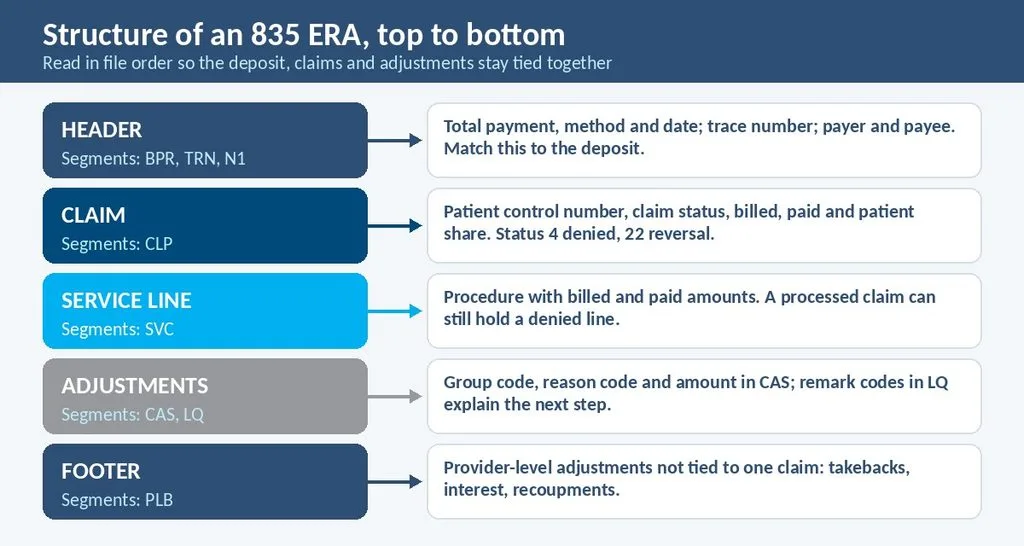
An 835 contains a payment header, one block per claim, one block per service line within each claim, and provider-level adjustments at the end. The CAQH CORE rule identifies the transaction as version 005010X221A1. Reading in that order keeps the deposit, the claims and the adjustments tied together.
The 835 segments a biller needs to read
| Segment | Where it sits | What it tells you | What to check |
| BPR | Header | Total payment, method (such as ACH or check) and payment date | Does the total equal the deposit? |
| TRN | Header, after BPR | The trace number that links the ERA to the EFT | Store it with the deposit |
| N1 loops | Header | Payer and payee names | Is the payee the right provider or group? |
| CLP | Claim block | Patient control number, claim status, billed, paid and patient share | Does the status match the outcome? |
| SVC | Service line | Procedure with billed and paid amounts for each line | Does every line have a result? |
| CAS | Claim or line | Group code, reason code and amount for each adjustment | Does each adjustment have a reason? |
| LQ | Service line | Remark codes that explain an adjustment | Is a next step named? |
| PLB | Footer | Provider-level adjustments not tied to one claim | Is anything netted into the deposit? |
Segment roles follow the X12 835 as described in payer companion guides and CMS Chapter 22; exact element positions vary by implementation guide and payer companion guide.
What do the claim status codes mean?
The CLP segment carries a claim status code. Commonly cited values are 1 for processed as primary, 2 for secondary, 3 for tertiary, 4 for denied and 22 for reversal of a previous payment. A processed claim can still contain a denied line, so read the service-line detail even when the claim status looks routine.
What do the adjustment segments add?
Each CAS segment pairs a group code with a reason code and an amount, and one segment can hold several reason-and-amount sets. Medicare’s manual notes that current 835 structures allow only one reason code to explain one adjustment amount, and it places service-line remark codes in the LQ segment. Per the CMS manual chapter, claim-level remarks use MIA or MOA.
In billing audits, a common pattern is that teams read the claim status and the paid amount, then stop. The CAS and LQ detail is where the denial cause and the patient balance sit, so a posting rule that ignores them leaves money in the wrong bucket.
How Do You Match an ERA to the Bank Deposit?
Match an ERA to a deposit with the TRN trace number: the payer assigns it, places it in the 835 and sends the same number with the EFT. The CORE rule says the ACH trace number is a different number, assigned by the originating bank, and should not be used for matching.
Your bank does not always show the number by default. Per the CAQH CORE 370 rule, providers must arrange with their financial institution to receive the minimum payment data, and the bank must supply the trace number by the second banking day when asked. Confirm your deposit notices include it.
Timing matters too. Under that rule, plans release the 835 no sooner than three business days before the EFT effective entry date and no later than three business days after it. A payment or remittance counts as late or missing after four business days from receipt of either one. Ask each payer for its written late and missing procedures, as the CMS reassociation guide advises.
When the deposit arrives without an ERA, do not post the money to a guess. Park it as unapplied cash, request the ERA from the payer or clearinghouse, and apply it once the file arrives. Slow matching delays cash application and inflates A/R days, which our guide to lowering A/R days explains; our guide to solving slow medical billing payments covers the cash-flow side.
How Do You Read an ERA in Seven Steps?
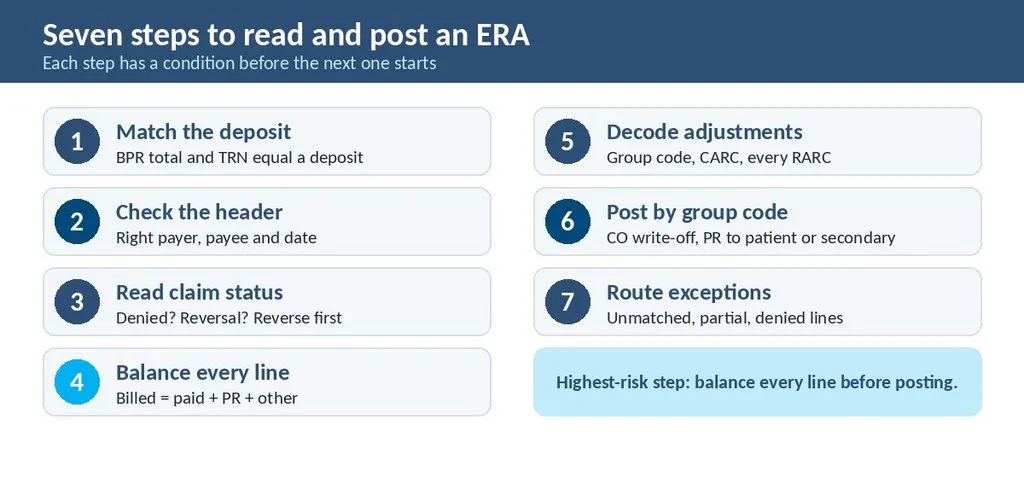
Read an ERA in seven steps: match the deposit, check the header, read each claim status, balance every line, decode the adjustments, post by group code, and route the exceptions. Each step has a condition, so the team does not post a line that does not balance or write off an amount that is billable.
- Match the deposit. When the BPR total and TRN equal a deposit, continue. When they do not, hold the file as unapplied cash.
- Check the header. Confirm the payer, the payee and the payment date. When the payee is wrong, stop and tell the payer.
- Read each claim status. When CLP shows denied, work the denial. When it shows a reversal, reverse the original posting first, then review the takeback.
- Balance every line. When billed does not equal paid plus patient responsibility plus other adjustments, find the missing adjustment before posting.
- Decode the adjustments. Read the group code, the reason code and every remark code. The CO-45 write-off is routine, while a reason such as CO-16 needs a corrected claim.
- Post by group code. Post CO amounts as write-offs when they match your contract, and move PR amounts to patient balance or the secondary payer.
- Route the exceptions. Send unmatched, partial and denied lines to a worklist built on a defined denial management workflow, and record the full code pair with the outcome.
Medicare practices can view and print 835 files with the free Medicare Remit Easy Print software from CMS, which serves professional providers and suppliers. Practices that rely on auto-posting still need staff for the lines the software cannot place, a design covered in our guide to revenue cycle management automation.
Do ERAs Look the Same for Medicare, Medicare Advantage, Medicaid and Commercial Plans?
The file format is the same, but delivery, enrollment and policy behind the codes differ by payer. Medicare practices enroll through their Medicare Administrative Contractor, while Medicare Advantage, Medicaid and commercial plans each run their own enrollment and publish their own companion guide.
How ERAs differ by payer type?
| Payer type | How you get the ERA | Watch-outs | Where to check |
| Original Medicare | Through your MAC after EDI enrollment; MREP can view and print the 835 | Ask your MAC how ERA enrollment is handled for your provider type | MAC EDI enrollment pages and CMS |
| Medicare Advantage | Plan-issued, enrolled separately from Original Medicare | Plan policy drives what each code means for your next step | Plan contract and provider manual |
| Medicaid and CHIP | State or managed care plan enrollment; format may add state rules | Cost-sharing and appeal steps differ by state | State Medicaid companion guide |
| Commercial | Payer portal or clearinghouse after payer-specific enrollment | Timing and enrollment forms vary | Payer companion guide |
Illustrative summary; actual enrollment steps and timing vary by payer and contract. Providers must enroll with each health plan to receive ERAs.
Can You Prove an ERA Balances? Worked Examples
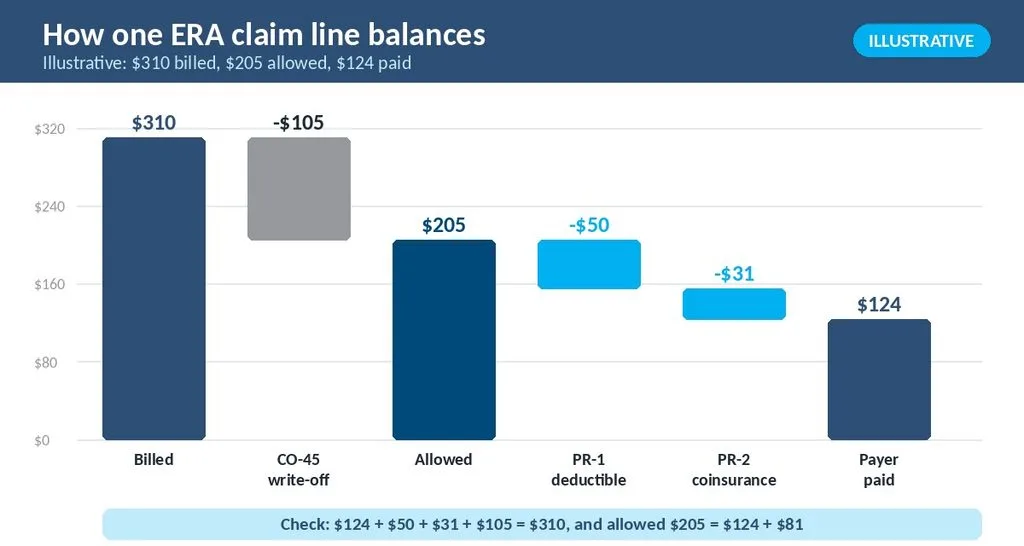
Yes: every claim line and every deposit follows simple arithmetic. Three examples cover a claim line, a deposit with a provider-level adjustment, and the auto-post match rate by payer. Each gives the formula first, then one numeric walkthrough, so your team can repeat the check on its own files. All figures are illustrative.
Example 1: balance one claim line
Formula: billed = paid + patient responsibility + other adjustments. Illustrative scenario (not an actual client record): a practice bills $310. The allowed amount is $205, so CO-45 posts $105. The patient owes $50 of deductible (PR-1) and $31 of coinsurance (PR-2), and the payer pays $124. Check: $124 + $50 + $31 + $105 = $310, and allowed equals $124 + $81 = $205.
Example 2: balance a deposit with a takeback
Formula: deposit = sum of claim payments minus provider-level adjustments. Illustrative scenario (not an actual client record): an ERA lists three claims paid $124.00, $85.50 and $0.00 (denied), a sum of $209.50. A PLB entry recoups $40.00. The deposit is $209.50 − $40.00 = $169.50.
A team that matches only claim totals sees a $40 shortfall and may suspect a payer error. The PLB segment explains it. Whether the recoupment is correct is a separate question, so compare it with the original overpayment notice and the claim it refers to before accepting the reduction.
Example 3: auto-post match rate by payer
Formula: match rate = lines auto-posted ÷ lines on the ERA × 100. Illustrative scenario (not an actual client record): a week’s ERAs hold 1,200 lines. Payer A posts 576 of 600 (96.0%), Payer B 380 of 400 (95.0%) and Payer C 100 of 200 (50.0%). The blend is 1,056 of 1,200, or 88.0%.
An 88.0% blend looks workable. Payer C is not. Half its lines fall to manual work, which points to a mapping or format issue with that payer. Compare each payer with its own history, because one missed week is a signal to investigate, not a verdict.
What Do Denials, Reversals and Takebacks Look Like on an ERA?
A denial usually shows $0.00 paid with a CO, PI or OA adjustment; a reversal shows claim status 22; and a takeback may appear in a PLB entry that lowers the deposit. All three reduce cash after you thought a claim was settled, so each needs its own posting rule.
- Denied line on a processed claim: post the adjustment, then route the line by cause.
- Reversal (status 22): reverse the earlier payment in your system before reviewing whether the payer is correct.
- Provider-level adjustment: record it against the deposit, then match it to the notice the payer issued.
A recurring pattern in posting reviews is a reversal posted as a new payment, which double counts cash for weeks. A short rule fixes it: reverse first, then re-post the corrected payment. Add a check to the weekly review that compares reversal counts on the ERA with reversal entries in the ledger, so a missed one is caught within days.
How Should You Use ERA Numbers Correctly?
Use ERA metrics to find the next question, not to grade the team. Compare payers with their own history, and compare similar specialties with similar specialties, because payer mix and claim types change match rates and denial shares. One weak week is a signal to investigate, not a verdict.
- Compare Medicare with Medicare, and commercial plans with commercial plans.
- When a payer’s match rate falls, check for a changed file format or a new code before blaming staff.
- Track unapplied cash by age, since old unapplied dollars are often misposted or unmatched.
Reports that break results out by payer make these checks routine, and they surface a changing payer file format within a week instead of at month end. Our guide to reading billing reports lists the views worth requesting.
How Long Until Better ERA Reading Pays Off?
Most practices can write a posting standard and fix mapping in a few weeks, while measurable change in unapplied cash and denial routing takes a couple of billing cycles. These are general planning ranges, not guarantees, and results vary by payer mix and staffing.
- 1 to 3 weeks: write the seven-step standard, set up TRN storage and park unmatched cash in one queue.
- 30 to 90 days: auto-post exceptions per payer shrink as mapping issues are fixed.
- 3 to 6 months: unapplied cash ages less, and denial causes route to worklists with fewer handoffs.
Where Do Posting Teams Misread an ERA?
Teams misread an ERA when they trust one number, such as the total or the paid amount, and never reach the adjustment detail or the footer. Six mistakes recur in posting reviews, and each has a short correction you can add to your posting rules.
- Matching by total only. Match by TRN, then compare the total.
- Ignoring PLB entries. Read the footer before closing a deposit.
- Computing patient balance as billed minus paid. Use PR amounts, since CO write-offs are not the patient’s.
- Posting a reversal as new cash. Reverse the original first.
- Writing off OA and PI lines like CO. Review them, since some are recoverable.
- Posting from the EOB. Use the ERA when one exists, since it carries the coded detail.
ERA and 835 Quick Summary
- An ERA is the 835 file that explains payment for the provider; the EOB is the patient’s copy; the EFT moves the money.
- Match the deposit with the TRN trace number, not the ACH trace number.
- Plans release the ERA within three business days before or after the EFT effective entry date; four business days marks late or missing.
- Each claim line should balance: billed equals paid plus patient responsibility plus other adjustments.
- A deposit equals claim payments minus provider-level adjustments.
- Practical targets in this guide are working conventions, not mandates from CMS or X12.
Self-Assessment: Does Your Team Read ERAs Correctly?
Answer yes or no for your practice.
- Do you match every deposit to an ERA by TRN, not by total alone?
- Does your bank deposit notice include the trace number?
- Do you know each payer’s ERA enrollment status?
- Do staff read the CLP status and the line detail, not only the paid amount?
- Do you balance every claim line before posting?
- Is the PLB footer read and recorded for every deposit?
- Are reversals posted as reversals first?
- Do you report match rate by payer, not only the blended rate?
- Is unapplied cash reviewed by age at least weekly?
Scoring guide: 8 to 9 yes answers suggest a mature process; keep reviewing quarterly. 5 to 7 yes answers suggest gaps worth closing in the next 60 days. 4 or fewer suggest ERAs are costing you cash visibility and deserve priority attention.
When Is It Time to Get Outside Help With ERA Posting?
Outside help makes sense when ERA volume or payer count outgrows the people doing the posting, and when unapplied cash or exceptions keep rising despite effort. Watch for these signals:
- Unapplied cash keeps growing and nobody can match it to a payer.
- Deposits and ERAs rarely tie out without manual searching.
- Takebacks and reversals are found weeks after the payer issued them.
- Auto-post exceptions pile up for one or two payers.
- Denials from ERAs are not reaching a worklist within a few days.
Look for support that matches by TRN, reads full code pairs, reports by payer, and documents each exception. Ask how the vendor handles payer enrollment, late ERAs and file-format changes, and whether you receive reports and not only collections totals.
Aspect Billing Solutions is one example. The team provides end-to-end billing and coding, credentialing, eligibility verification and prior authorization, denial management, A/R follow-up and compliance support, with a dedicated agent assigned to each provider. Its denial management and appeals service works from ERA detail, and the range appears on its services page. Results vary by practice. Explore the revenue cycle management service.
Final Thoughts: Read the Header, Then Every Line
How to read an ERA / 835 remittance advice comes down to one habit: tie the deposit to the file, then tie each claim to its adjustments. The TRN matching key, the three-business-day release window and the four-business-day late threshold come from the published CORE rule. The balance checks and match-rate comparisons are practical conventions.
The worked examples are illustrative. They show a real pattern: totals can balance while one payer, one PLB entry or one reversal hides the problem. Reading the header, the lines and the footer in order keeps those items visible, and an EHR integration that carries the full 835 detail makes the habit easier to keep.
Your natural next question is how much unapplied cash and how many manual auto-post exceptions your practice carries today. A weekly count by payer answers it. If you want a team to run that process and work the lines behind it, see the revenue cycle management service from Aspect Billing Solutions.
ERA and 835 FAQs
What does ERA stand for and what is an 835?
ERA stands for electronic remittance advice. The 835 is the HIPAA-standard X12 file that carries it, listing payment, adjustments and patient responsibility for each claim. Practices receive it from a health plan, directly or through a clearinghouse, after enrolling, and billing software reads it to post payments.
What is the difference between an ERA and an EOB?
An ERA is the coded electronic file a payer sends the provider so software can post payments. An EOB is the patient-facing summary of the same decision. Both describe one claim, but only the ERA carries the group, reason and remark codes needed for accurate posting and denial work.
How do you match an ERA to a bank deposit?
Use the TRN trace number in the ERA header, which the payer also sends with the EFT. Do not use the ACH trace number. Ask your bank to include the trace number on deposit notices, then compare the deposit amount with the BPR payment total.
Why did a deposit arrive without an ERA?
ERA and EFT enrollments can be separate, and plans may release the 835 up to three business days before or after the payment date. Park the money as unapplied cash and request the file. After four business days from receipt, the CORE rule treats it as late or missing.
What is a good ERA auto-post match rate?
No national body sets a target. A practical approach is to track match rate per payer and compare each with its own history, since a blended rate can hide one payer with poor mapping. Investigate any payer that falls well below its usual level.
What is a good time to post an ERA after receiving it?
No published standard sets a posting deadline. A common practical target is to post and reconcile within one or two business days of receipt, so unapplied cash and A/R days stay accurate. Choose a target your team can meet and review it monthly.
Sources and Methodology
(a) Published standards and definitions: CAQH CORE Phase III 370 EFT & ERA Reassociation (CCD+/835) Rule, version 3.0.0 (June 2012), covering the TRN trace number, release window and late or missing definition; CAQH CORE Phase III 360 rule, version 3.0.0 (June 2012), identifying the 005010X221A1 version of the 835; CMS, EFT and ERA Payment Remittance Reassociation Basics; CMS Medicare Claims Processing Manual, Pub. 100-04, Chapter 22; CMS Medicare Remit Easy Print page; CMS EDI enrollment guidance for Medicare providers; ASC X12 claim adjustment group code list.
(b) Named benchmarking data providers: none cited in this guide.
(c) Practical or illustrative targets: the balance checks, match-rate comparison, planning ranges, claim status code summaries from vendor and payer guides, and all worked examples are working conventions or illustrations commonly used across industry sources. CMS, AMA, AAPC, MGMA, HFMA and X12 do not mandate them. Payers may implement segments differently.
(d) Survey and study data: none cited in this guide.
Results vary by practice, specialty, payer mix and state. Figures and rules reflect information available at the time of research in October 2026; CORE rule versions, CMS instructions and payer companion guides change over time.