
CMS-1500 Form Filling Guide: Box-by-Box Instructions for 2026
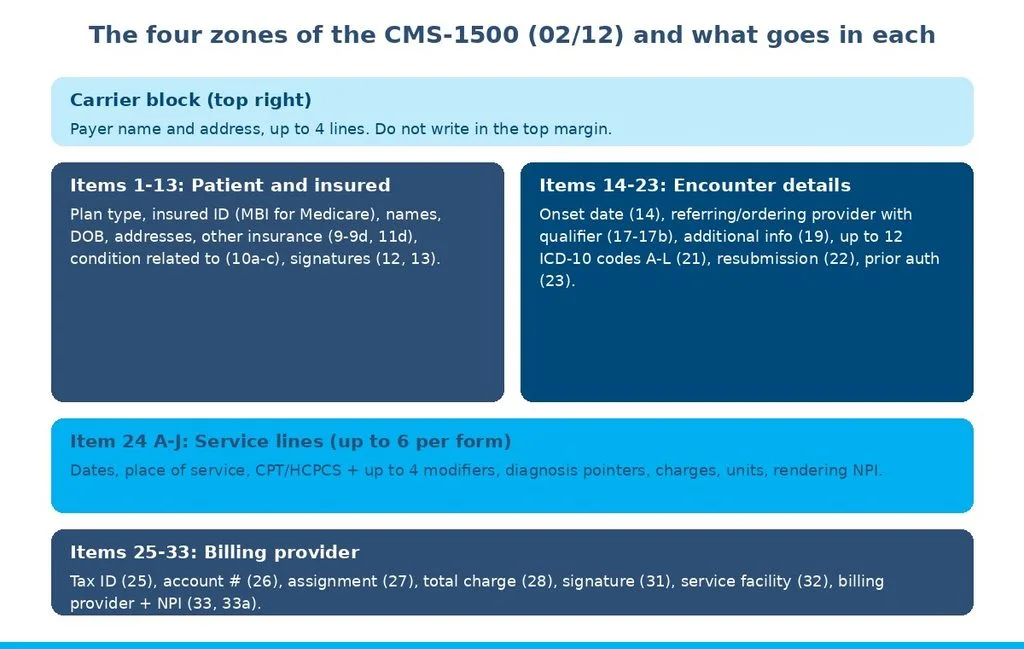
A CMS-1500 form filling guide explains how to complete the 1500 Health Insurance Claim Form (version 02/12), the standard paper claim for professional services. Items 1-13 capture patient and insured data, items 14-23 capture encounter details and up to 12 ICD-10 codes, Item 24 holds up to six service lines, and items 25-33 identify the billing provider.
Most claim rejections come from a handful of fields, not from coding: an insured ID that does not match the card, a diagnosis pointer entered as a code instead of a letter, or an NPI in the wrong box. This guide walks through every item using the current NUCC instructions, shows where Medicare differs, and explains how to measure your own claim accuracy with four formulas. A ten-question self-assessment checklist near the end scores your claim process in a few minutes.
Key Numbers Cheat Sheet
CMS-1500 numbers at a glance
| Metric | Practical target/range | Review frequency | Source type |
| Service lines per form | Maximum 6; use another form for more | Fixed by form design | [P] NUCC 1500 instructions |
| Diagnosis codes / pointers / modifiers | Up to 12 codes (A-L); up to 4 pointers and 4 modifiers per line | Fixed by form design | [P] NUCC 1500 instructions |
| Medicare timely filing | 12 months from the date of service | Annually | [P] CMS |
| First-pass claim acceptance rate | 95% or higher, per payer | Weekly or monthly | [I] commonly reported across industry sources |
| Date of service to claim submission | 3 business days or fewer | Weekly | [I] practical target |
[P] = published standard from NUCC or CMS. [I] = practical or industry-convention target, not a CMS, AMA, AAPC, MGMA or HFMA mandate. Results vary by payer mix, specialty and billing system.
What is the CMS-1500 form, and who still uses paper?
The CMS-1500 is the standard claim form for professional services billed by physicians, non-physician practitioners and suppliers, maintained by the National Uniform Claim Committee (NUCC). The current version is 02/12, and its fields correspond to the electronic 837P professional claim that most practices actually send.
Medicare requires electronic claims under the Administrative Simplification Compliance Act (ASCA), and accepts paper only when a provider qualifies for an exception, such as the small-provider exception for physician practices with fewer than 10 full-time-equivalent employees. Commercial payers, auto and workers’ compensation carriers, and some small plans still receive paper claims, so many practices file some 1500s each month.
Even practices that never print a form benefit from knowing it. Clearinghouse and payer rejections on 837P claims are usually described in terms of the same fields, so a biller who knows Box 24E or Box 33a can fix an electronic rejection quickly. Our guide to electronic claims clearinghouse services explains how that electronic route works.
Which instructions apply
The NUCC publishes a reference instruction manual every July. As of this update, NUCC lists Version 13.0 7/25 of the 1500 instruction manual as current for the 02/12 form; check NUCC for any newer release. Medicare’s item-by-item rules sit in Chapter 26 of the Medicare Claims Processing Manual, and each Medicaid program and commercial payer may add its own requirements in a separate document.
How do you complete Items 1-13 (patient and insured information)?
Items 1-13 identify the patient, the insured person and any other coverage. Copy every value exactly from the current insurance card and the registration record, because a mismatch in these fields is the most common reason a claim is rejected before adjudication.
Items 1-13 at a glance
| Item | Field | How to complete |
| 1 | Type of insurance | Mark one box only (Medicare, Medicaid, TRICARE, CHAMPVA, Group Health Plan, FECA Black Lung, Other) |
| 1a | Insured’s ID number | ID exactly as on the card; Medicare Beneficiary Identifier (MBI) for Medicare |
| 2 | Patient’s name | Last name, first name, middle initial, separated by commas; no nicknames or titles |
| 3 | Patient’s birth date, sex | 8-digit date (MM DD YYYY) and sex |
| 4 | Insured’s name | Policyholder’s name; for Medicare, only when insurance is primary to Medicare |
| 5 | Patient’s address | Street, city, state, ZIP; phone if the payer requires it |
| 6 | Relationship to insured | Self, spouse, child or other |
| 7 | Insured’s address | Policyholder’s address |
| 8 | Reserved for NUCC use | Leave blank |
| 9, 9a, 9d | Other insured | Secondary coverage name, policy or group number, plan name (9b and 9c are reserved) |
| 10a-10c | Condition related to | Employment, auto accident (with state), other accident |
| 10d | Claim codes | Condition codes designated by NUCC, when a payer requires them |
| 11-11c | Insured’s policy group, DOB, other claim ID, plan name | Primary policy details; “NONE” in 11 for Medicare when nothing is primary |
| 11d | Another health benefit plan? | Mark yes or no; if yes, complete 9, 9a and 9d |
| 12 | Patient’s signature | Release of information; “Signature on File” (SOF) when a signed form is on file |
| 13 | Insured’s signature | Authorizes payment to the provider; SOF when on file |
Summarized from NUCC Version 13.0 7/25 and CMS Claims Processing Manual Chapter 26. Payer-specific instructions may add requirements.
Getting identifiers right
Box 1a and Box 2 must match the payer’s eligibility record character for character. Running an eligibility check at each visit catches changed IDs and new plans before the claim is built; our insurance eligibility verification guide covers the process. For Medicare, use the MBI, not an old Social Security-based number.
Box 12 vs Box 13
It authorizes release of medical information needed to process the claim. Box 13 authorizes the payer to pay the provider directly. A blank Box 13 can send payment to the patient on an otherwise clean claim, so keep both signed authorizations on file and enter “SOF.”
In claim reviews, a common pattern is secondary insurance entered in Box 9 while Box 11d is left blank or marked “No.” Payers read 11d first, so the mismatch causes coordination-of-benefits rejections that look like coverage problems but are really form errors.
How do you complete Items 14-23 (encounter and diagnosis details)?
Items 14-23 describe the episode of care: dates, the referring or ordering provider, diagnoses, prior authorization and resubmission data. The two fields that matter most for payment are Box 17 for orders and referrals and Box 21 for diagnoses.
Table 3. Items 14-23 at a glance
| Item | Field | How to complete |
| 14 | Date of current illness, injury or pregnancy | Date with qualifier 431 (onset) or 484 (last menstrual period), when the payer requires it |
| 15 | Other date | Related date with its NUCC qualifier, such as 454 (initial treatment) |
| 16 | Dates unable to work | From and to dates, when relevant |
| 17 | Name of referring provider or other source | Qualifier DN (referring), DK (ordering) or DQ (supervising) left of the dotted line, then the name |
| 17a / 17b | Other ID / NPI | Other ID with qualifier only if required; NPI in 17b |
| 18 | Hospitalization dates | Admission and discharge dates related to current services |
| 19 | Additional claim information | Payer-designated information; follow each payer’s instructions |
| 20 | Outside lab? | Yes or no, with purchased service charges if yes |
| 21 | Diagnosis codes | ICD indicator “0” for ICD-10; up to 12 codes in A-L, no decimal points |
| 22 | Resubmission code | 7 (replacement) or 8 (void) with the original claim number; Medicare leaves blank |
| 23 | Prior authorization number | Authorization number; for Medicare lab services, the CLIA number |
Summarized from NUCC Version 13.0 7/25 and CMS Claims Processing Manual Chapter 26.
Box 17 qualifiers
Medicare requires the name and NPI of the provider who ordered or referred items and services such as lab tests, imaging and DME. CGS’s Medicare claim submission chapter lists the qualifiers: DN for the referring provider, DK for ordering and DQ for supervising, entered to the left of the dotted line in item 17. A missing or mismatched ordering NPI is a common rejection on lab and imaging claims.
Box 21 and diagnosis coding
Enter ICD-10-CM codes to the highest specificity the record supports, in priority order, without decimal points. The form holds 12 codes in slots A through L, and the codes must be valid for the date of service, since ICD-10-CM updates take effect each October 1. Our ICD-10 coding errors guide covers specificity problems that also trigger denials.
How do you complete Item 24 (the service lines)?
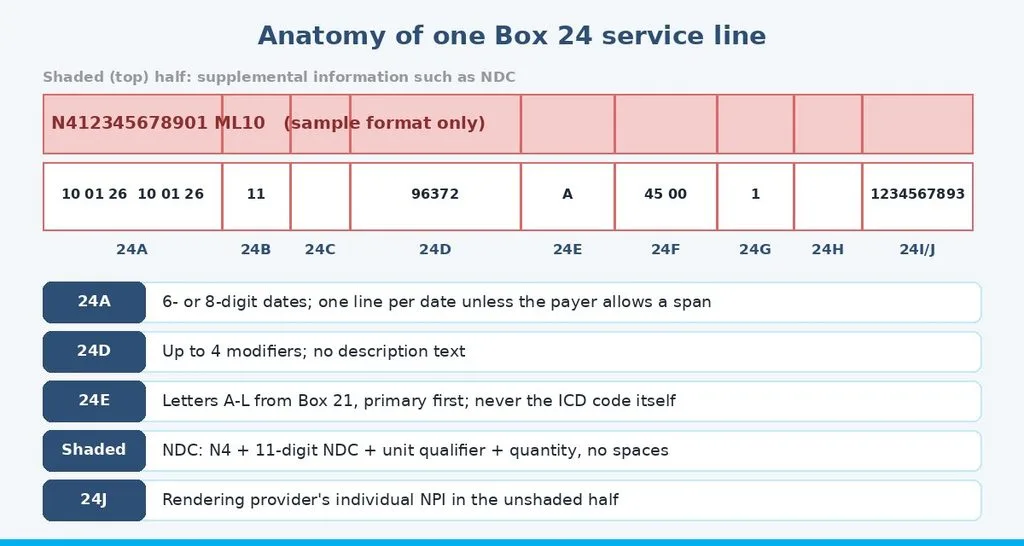
Item 24 lists each billed service on its own line, up to six lines per form, with the date, place of service, procedure code, diagnosis pointer, charge, units and rendering NPI. Each line has a white (unshaded) half for the claim data and a shaded half for supplemental information.
Item 24 columns
| Column | Field | How to complete |
| 24A | Dates of service | From and to dates, 6- or 8-digit; one line per date unless the payer allows a span |
| 24B | Place of service | Two-digit CMS place of service code, such as 11 (office) |
| 24C | EMG | Emergency indicator, only when the payer requires it |
| 24D | Procedures, services or supplies | CPT or HCPCS code plus up to 4 modifiers; no narrative text |
| 24E | Diagnosis pointer | Letters A-L from Box 21, primary first, up to 4; never the ICD-10 code itself |
| 24F | Charges | Total charge for the line (units x unit price); no dollar sign |
| 24G | Days or units | Number of units billed |
| 24H | EPSDT / family plan | Medicaid-specific indicators when required |
| 24I | ID qualifier (shaded) | Qualifier for a non-NPI identifier, when a payer requires one |
| 24J | Rendering provider ID | Rendering provider’s individual NPI in the unshaded half |
Summarized from NUCC Version 13.0 7/25. Medicare’s line rules appear in CMS Claims Processing Manual Chapter 26.
The shaded area and NDC reporting
When a payer requires a National Drug Code for a drug billed in 24D, enter it in the shaded area above that line: qualifier N4, the 11-digit NDC without hyphens, a unit qualifier such as UN, ML, GR or F2, and the quantity. Medicaid programs commonly require NDCs on physician-administered drugs; our injection administration coding guide covers the related codes.
Modifiers and pointers
Modifiers go in the four modifier slots in 24D, with the payment-affecting modifier first. Pointers in 24E link each line to the diagnoses that justify it, primary first. Our CPT modifiers guide for family practice explains modifier order for common primary care services.
How do you complete Items 25-33 (billing provider information)?
Items 25-33 identify who is billing and where care was delivered: tax ID, patient account, assignment, totals, signature, service facility and billing provider. Most provider-identifier rejections come from this block, usually a mismatch between Box 33a and the payer’s enrollment record.
Items 25-33 at a glance
| Item | Field | How to complete |
| 25 | Federal tax ID | EIN or SSN of the billing entity, with the matching box marked |
| 26 | Patient’s account number | Practice’s internal account number for the patient |
| 27 | Accept assignment? | Yes or no; Medicare participating providers accept assignment |
| 28 | Total charge | Sum of the Box 24F charges on that form |
| 29 | Amount paid | Amount already paid by the patient or another payer, per payer rules |
| 30 | Reserved for NUCC use | Leave blank |
| 31 | Signature of physician or supplier | Signature or “Signature on File,” with date |
| 32 / 32a / 32b | Service facility location | Name and physical address where services were rendered; facility NPI in 32a |
| 33 / 33a / 33b | Billing provider info | Billing name, address and phone; group or billing NPI in 33a; other ID in 33b if required |
Summarized from NUCC Version 13.0 7/25 and CMS Claims Processing Manual Chapter 26.
Box 24J vs Box 33a
It carries the individual rendering provider’s NPI. Box 33a carries the billing provider’s NPI, usually the group NPI for a group practice. Putting the group NPI in 24J, or an individual NPI in 33a when the payer enrolled the group, is one of the most frequent provider-ID rejections. A solo provider billing under their own name typically uses the same individual NPI in both boxes.
From billing reviews, practices that changed locations or tax IDs often keep printing an old address in Box 33 from the practice management system. Payers match Box 33 against enrollment, so update the system and every payer enrollment together.
How does Medicare differ from other payers on the CMS-1500?
Medicare follows the NUCC layout but adds its own item rules in Chapter 26 of the Claims Processing Manual, and it only accepts paper from providers that qualify for an ASCA exception. Other payers mostly follow NUCC, with their own additions.
Illustrative payer differences on the CMS-1500
| Topic | Medicare | Medicare Advantage | Medicaid | Commercial |
| Paper accepted? | Only with an ASCA exception | Plan-specific; many require electronic | State-specific | Usually accepted |
| Box 1a | MBI | Plan member ID | State recipient ID | Member ID from card |
| Box 11 | “NONE” if no primary insurance | Plan instructions | State instructions | Group or policy number |
| Box 22 | Leave blank | Often 7 or 8 for corrections | State rules | Often 7 or 8 for corrections |
| Extra rules | Chapter 26 item rules | Plan provider manual | State provider manual (NDCs common) | Payer policy and contract |
Illustrative summary from NUCC, CMS and MAC instructions; actual rules vary by plan, state and contract. Check each payer’s manual.
The Medicare Claims Processing Manual, Chapter 26 is the authority for Medicare paper claims. It requires the MBI in item 1a and confirms Medicare accepts paper only on the 02/12 version. Medicaid manuals often add box-level rules; California’s Medi-Cal, for example, publishes its own CMS-1500 completion instructions.
How do you measure CMS-1500 claim accuracy?
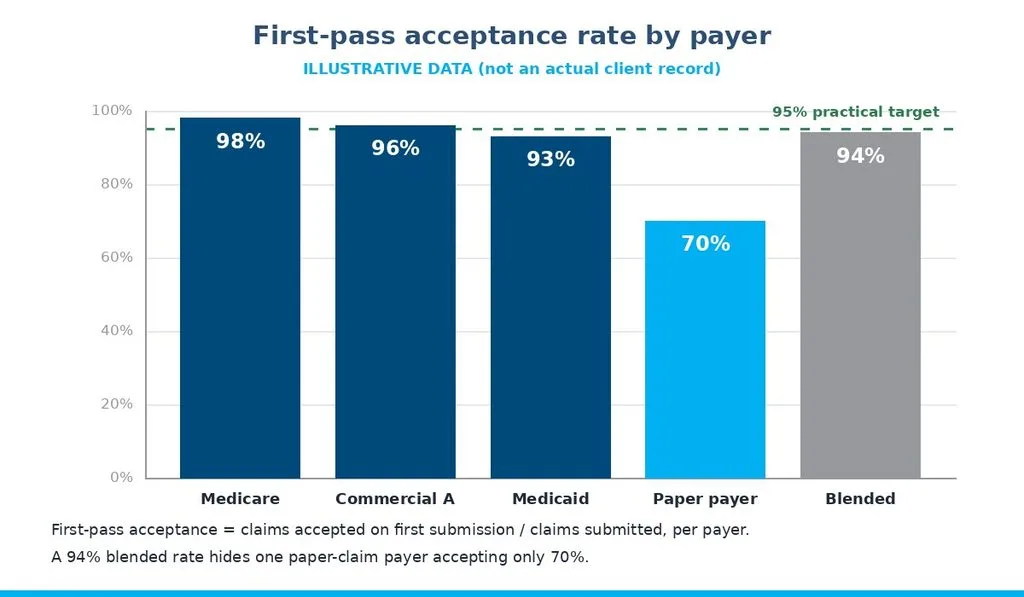
Measure claim accuracy with four checks: first-pass acceptance by payer, rejection causes by form section, charge arithmetic, and submission lag. Track each by payer and by user, because a blended average can hide one payer or one workflow that fails repeatedly.
Worked example 1: first-pass acceptance by payer
Formula: claims accepted on first submission ÷ claims submitted. Illustrative scenario (not an actual client record): 1,130 of 1,200 claims are accepted the first time, a 94% blended rate. By payer, Medicare accepts 490 of 500 (98%), Commercial A 384 of 400 (96%), Medicaid 186 of 200 (93%), and one paper-only payer just 70 of 100 (70%). The blended figure hides the paper workflow.
Worked example 2: rejections by form section
Formula: rejections caused by a form section ÷ all rejections. Illustrative scenario: of 70 rejections, 26 come from patient and insured data in Items 1-13 (37%), 17 from provider identifiers in 24J, 32 or 33 (24%), 15 from diagnosis codes or pointers (21%), and 12 from other fields (17%). Fixing registration and provider setup would remove most rejections.
Worked example 3: charge arithmetic
Formula: Box 24F = units × unit price for each line; Box 28 = sum of 24F on that form. Illustrative scenario: lines for 99214 at $180, 36415 at $25, 85025 at $40 and a drug billed as 4 units at $12.50 ($50). Box 28 should be $295. A Box 28 that does not equal the sum of the lines is a common paper-claim rejection.
Worked example 4: submission lag
Formula: total days from date of service to claim submission ÷ claims submitted. Illustrative scenario: 1,200 claims carry 10,800 total lag days, an average of 9 days against a practical target of 3 business days. Faster submission means faster cash; our guide to automated medical claim submission covers how practices shorten it.
How should you interpret these numbers?
Compare like with like: the same payer, the same submission channel and the same period. A paper-claim payer will not match an electronic one, and a month with a new payer or software change will look different from a steady month. Treat one bad week as a reason to look at the rejection reports, not as a verdict.
Read the metrics together. High acceptance with a long submission lag means claims are clean but slow. Rejections concentrated in Items 1-13 point to front-desk registration, while rejections in Boxes 24J, 32 and 33 point to provider enrollment and system setup. Our guide to why medical claims get rejected explains how rejections differ from denials.
What is the step-by-step process for completing a CMS-1500?
Fill the form in the same order every time, and check each section against its source document before moving on. The order below follows the form and matches how most rejections are caught.
- Confirm the payer accepts paper, the correct mailing address for the carrier block, and any payer-specific completion manual.
- Verify eligibility and copy Items 1-13 from the current insurance card and registration record.
- Complete Items 14-23 from the encounter note, including ordering or referring provider with qualifier and up to 12 ICD-10 codes.
- Enter each service in Item 24 with date, place of service, code, modifiers, pointer letters, charge, units and rendering NPI.
- Complete Items 25-33, checking tax ID, service facility address and billing NPI against enrollment records.
- Check the arithmetic: each 24F equals units times price, and Box 28 equals the sum of 24F.
- Print in black ink on the original red-ink form, sign or mark Box 31, and keep a copy before mailing.
When a claim comes back rejected, correct and resubmit it promptly rather than waiting, and use Box 22 resubmission codes only where the payer accepts them. This sequence fits within a broader front-end revenue cycle workflow from check-in to claim submission.
How long does it take to improve claim accuracy?
Setup fixes such as payer addresses, NPIs and templates usually take a few weeks, while acceptance rates and lag times settle over a few months. Treat these as general planning ranges, not guarantees.
Correcting provider enrollment data, payer address tables and claim templates is often complete within 2 to 6 weeks. Front-desk registration habits usually improve within 1 to 3 months of feedback. First-pass acceptance and submission lag typically show partial improvement within 30 to 60 days and steadier results within one or two quarters.
What are the most common CMS-1500 mistakes?
The most common mistakes are data that do not match the card or enrollment record, pointers entered as codes, and provider NPIs in the wrong box. Each has a simple control.
Entering diagnosis codes in Box 24E
Box 24E takes letters A-L, not ICD-10 codes or numbers. Some online guides still describe numeric pointers; the 02/12 form uses letters.
Leaving Box 11d inconsistent with Box 9
If secondary coverage is listed in Box 9, mark “Yes” in 11d and complete 9a and 9d. Inconsistent coordination-of-benefits fields stall claims.
Mixing up Box 24J and Box 33a
Individual rendering NPI goes in 24J; billing NPI in 33a. Check against each payer’s enrollment record.
Using photocopied or printed forms
Payers scan paper claims with optical character recognition (OCR). Medicare and most payers require the original form printed in red dropout ink; photocopies and plain-paper printouts commonly reject.
Using the wrong totals or old codes
Box 28 must equal the sum of the 24F charges on that form, and every code must be valid on the date of service. The list of common claim denial reasons and fixes covers the denials that follow when bad data gets through.
A pattern that shows up repeatedly in claim reviews is a Box 32 service facility that duplicates Box 33 even when care happened at another site, such as a nursing facility. Box 32 should show where the service was actually furnished.
Quick Summary
- The CMS-1500 (02/12) is the paper professional claim; its items map to the electronic 837P.
- Items 1-13 must match the insurance card and eligibility record exactly; use the MBI for Medicare.
- Box 21 holds up to 12 ICD-10 codes (A-L) without decimals; Box 24E holds up to 4 pointer letters.
- Up to 6 service lines per form, 4 modifiers per line; Box 28 equals the sum of 24F.
- Box 24J is the rendering NPI; Box 33a is the billing NPI.
- Aim for 95% or higher first-pass acceptance per payer and 3 business days or fewer from service to submission as practical targets.
Self-Assessment Checklist
Answer yes or no for your practice:
- Do you verify eligibility and copy Box 1a and Box 2 from the current card at every visit?
- Is Box 11d always consistent with any secondary coverage in Box 9?
- Do Box 17 entries include the DN, DK or DQ qualifier and the ordering or referring NPI?
- Are ICD-10 codes entered without decimals and valid for the date of service?
- Do Box 24E entries always use pointer letters, never codes?
- Is the rendering NPI always in 24J and the billing NPI in 33a?
- Does Box 28 always equal the sum of the 24F charges?
- Is your first-pass acceptance rate 95% or higher for every major payer?
- Do you submit claims within 3 business days of the date of service on average?
- Do you use only original red-ink forms for paper claims?
Scoring: 9 to 10 yes answers means strong claim controls; keep monthly reviews. 6 to 8 yes answers means targeted gaps; fix the “no” items within one quarter. 5 or fewer means rejections are likely costing time and cash; prioritize a claim-process review.
When should a practice consider professional support?
Consider outside support when claim errors keep returning after training and template fixes. These signals usually mean the in-house approach has reached its limits:
- First-pass acceptance stays below 95% for a major payer for two or more months.
- The same rejection reasons repeat after staff training.
- Claims routinely wait more than a week after the date of service.
- Provider enrollment changes are not reflected in Box 33 or 24J.
- Nobody tracks payer-specific completion rules or NUCC updates.
When evaluating help, look for teams that scrub claims against NUCC and payer rules, maintain provider enrollment data, report acceptance by payer, and fix rejections within a defined turnaround. A dedicated claim submission service for private clinics is one option when submission volume outgrows the front desk.
Aspect Billing Solutions is one example of this kind of partner. Its medical billing and coding services cover end-to-end billing and coding, credentialing, eligibility verification and prior authorization, denial management, A/R follow-up and compliance support, with a dedicated agent assigned to each provider. Results vary by practice, specialty and payer mix. You can review how the team handles revenue cycle management for medical practices.
Final Considerations
A CMS-1500 form filling guide is really a guide to matching data: the card, the eligibility record, the encounter note and the enrollment file. Claims that match those sources field by field are accepted on the first pass whether they travel on paper or as an 837P.
Some figures here are firm published standards: six service lines, 12 diagnosis codes, four modifiers and four pointers per line, the Box 17 qualifiers, and Medicare’s 12-month filing limit. The 95% acceptance target and the 3-day submission target are practical targets, and all worked-example figures are illustrative. The natural next question is how your own claims compare. Pull one month of claims, calculate first-pass acceptance by payer and rejections by form section, and score the checklist. If the gaps are larger than your team can close, explore claim submission and revenue cycle support from Aspect Billing Solutions
Frequently Asked Questions
What is the difference between the CMS-1500 and the UB-04?
The CMS-1500 is used for professional services billed by physicians, non-physician practitioners and suppliers. The UB-04 (CMS-1450) is used for institutional claims from hospitals, skilled nursing facilities and other facilities. Their electronic equivalents are the 837P and 837I. A physician practice uses the CMS-1500 even for services furnished in a facility.
How many diagnosis codes can a CMS-1500 hold?
The 02/12 CMS-1500 holds up to 12 ICD-10-CM diagnosis codes in Box 21, labeled A through L, with the ICD indicator “0” for ICD-10. Each service line in Box 24E can point to up to four of those letters, primary first. Enter codes without decimal points.
What is a good first-pass acceptance rate for CMS-1500 claims?
A practical target is 95% or higher of claims accepted on first submission, measured separately for each payer. It is commonly reported across industry sources, not a CMS mandate. A blended rate can hide one payer or paper workflow with frequent rejections, so check each payer’s rate.
What is a good way to report an NDC on the CMS-1500?
Enter the NDC in the shaded area above the Box 24 line for the drug: qualifier N4, the 11-digit NDC without hyphens, a unit qualifier such as UN, ML, GR or F2, and the quantity, with no spaces. Many Medicaid programs require NDCs on physician-administered drugs.
Can I submit paper CMS-1500 claims to Medicare?
Only if you qualify for an exception under the Administrative Simplification Compliance Act, such as the small-provider exception for physician practices with fewer than 10 full-time-equivalent employees. Otherwise Medicare requires electronic 837P claims. Paper Medicare claims must use the original 02/12 form.
What goes in Box 24J vs Box 33a?
Box 24J holds the individual NPI of the provider who rendered the service on that line. Box 33a holds the billing provider’s NPI, usually the group NPI for a group practice. A solo provider billing under their own name typically uses the same individual NPI in both boxes.
Sources and Methodology
(a) Published standards and definitions: NUCC 1500 Health Insurance Claim Form Reference Instruction Manual, Version 13.0 7/25 for form version 02/12; CMS Medicare Claims Processing Manual, Pub. 100-04, Chapter 26 (completing the CMS-1500) and Chapter 24 (ASCA electronic claim requirements); CGS Medicare claim submission instructions for Box 17 qualifiers; California Medi-Cal CMS-1500 completion instructions as a Medicaid example.
(b) Named benchmarking data providers: none used. No MGMA, HFMA or vendor benchmark is cited for acceptance rates.
(c) Practical or illustrative targets: the 95% first-pass acceptance rate is commonly reported across industry sources; the 3-business-day submission target and improvement timeframes are practical planning ranges; all worked-example figures, including the sample NDC format in Image 4, are illustrative and not client records.
(d) Survey or study data: none cited as a statistic in this article.
Results vary by practice, specialty, payer mix and billing system. Figures reflect information available at the time of research (October 2026). NUCC instructions are updated each July, ICD-10-CM codes each October, and CPT and HCPCS codes at least annually, so review this guidance each year.